macOS Monterey
macOS Monterey (version 12) is the 18th and current major release of macOS, Apple's desktop operating system for Macintosh computers. The successor to macOS Big Sur, it was announced at WWDC 2021 on June 7, 2021,[4][5][6][7] and released on October 25, 2021.[8][9]
| A version of the macOS operating system | |
 | |
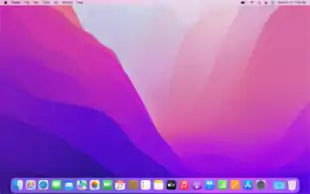 Screenshot of macOS Monterey in "light appearance" | |
| Developer | Apple Inc. |
|---|---|
| OS family | |
| Source model | Closed, with open source components |
| General availability | October 25, 2021[1] |
| Latest release | 12.1[2] (21C52)[3] (December 13, 2021) [±] |
| Update method | Software Update |
| Platforms | x86-64, ARM64 |
| Kernel type | Hybrid (XNU) |
| License | Proprietary software with open-source components and content licensed with APSL |
| Preceded by | macOS Big Sur |
| Official website | www |
| Support status | |
| Supported | |
| Part of a series on |
| macOS |
|---|
The operating system is named after Monterey Bay, continuing the trend of releases named after California locations since 10.9 Mavericks.
Changes
Monterey introduced several new features and changes, including:[4]
- Shortcuts for the Mac
- TestFlight for the Mac
- Provisions to allow the planned introduction of Universal Control,[10] which allows a single keyboard and mouse to control multiple Macs and iPads. It works on Mac computers with the Apple M1 chip and some with an Intel processor, including MacBook Pro (2016 and later), MacBook (2016 and later), MacBook Air (2018 and later), iMac (2017 and later), iMac (5K Retina 27-inch, Late 2015), iMac Pro, Mac mini (2018 and later), and Mac Pro (2019). It works on these iPads: iPad Pro, iPad Air (3rd generation and later), iPad (6th generation and later), and iPad mini (5th generation and later).
- Live Text, which allows a user to copy, paste, translate and lookup text from images displayed by Photos, Screenshot, Quick Look, and Safari.
- Low Power Mode for Mac. This works on MacBook (Early 2016 and later) and MacBook Pro (Early 2016 and later).[11]
- A redesigned Safari browser.
- Support for playing AirPlay content streamed from recent iOS and iPadOS devices and Macs, including: MacBook Pro (2018 and later), MacBook Air (2018 and later), iMac (2019 and later), iMac Pro (2017), Mac mini (2020 and later), Mac Pro (2019), iPhone 6s and later, iPad Pro (2nd generation and later), iPad Air (3rd generation and later), iPad (6th generation and later), and iPad mini (5th generation and later). Older iPhone, iPad, and Mac models may share content at a lower resolution to supported Mac models when “Allow AirPlay for” is set to “Everyone” or “Anyone on the same network” in Sharing preferences.
- Improvements to FaceTime, including the ability to share a screen and the SharePlay function that enables multiple users to watch or listen simultaneously and in sync (e.g., to music or TV shows).
- The ability to factory-reset the device from the System Preferences app[12]
- Focus to set different modes to filter notifications across iPhone, iPad, and Macs.
- The Time Machine backup functionality excludes more system files.[13]
- Provisions to allow the planned introduction of "Expanded Protections for Children" which will apply cryptography to detect and help limit the spread of child sexual abuse material (CSAM) online by scanning the user's iCloud photos and Messages attachments.[14]
- Accessibility option to change the mouse pointer's colors.
- Tips notifications.
- The removal of a previously bundled PHP interpreter.[15]
- The removal of the ability to use custom Quartz Composer filters and plugins in Photo Booth.
- networkQuality, a command-line tool for measuring upload/download capacity, upload/download flows, and upload/download responsiveness
Notes
In the Notes application, users can now apply arbitrary tags to a note (e.g., #cooking, #work); groups of notes with a given tag or tags can be viewed in Smart Folders or a Tag Browser in the sidebar.[16] The new Quick Notes function enables a user to create a note from within any app via system-wide keyboard shortcut or hot corner.[17]
Maps
Apple Maps adds a 3D globe, with increased mountain, desert, and forest detail.[18]
System requirements
macOS Monterey drops support for various Macs released from 2013 to 2015[19][20] including all Macs with Nvidia GPUs. Monterey works on all Macs equipped with Apple silicon SoCs, as well as the following models equipped with Intel CPUs:
- MacBook: Early 2016 and newer
- MacBook Air: Early 2015 and newer
- MacBook Pro: Early 2015 and newer
- Mac Mini: Late 2014 and newer
- iMac: Late 2015 and newer
- iMac Pro: Late 2017
- Mac Pro: Late 2013 and newer[21]
Release history
| Previous release | Current release | Current developer release |
| Version | Build | Date | Darwin version | Release notes | Notes |
|---|---|---|---|---|---|
| 12.0 | 21A344 | October 25, 2021 | 21.0.1 xnu-8019.30.61~4 Tue Sep 14 20:56:24 PDT 2021 |
N/A | Preinstalled on 2021 MacBook Pros |
| 12.0.1 | 21A559 | October 25, 2021 | 21.1.0 xnu-8019.41.5~1 Wed Oct 13 17:33:23 PDT 2021 |
Release notes | Initial public release |
| 12.1 | 21C52 | December 13, 2021 | 21.2.0 xnu-8019.61.5~1 Sun Nov 28 20:28:54 PST 2021 |
Release notes |
12.0 was pre-installed on 2021 MacBook Pros and Apple advised those with the version to be updated to 12.0.1.
Known problems
Users and developers have reported:
- problems with trackpads, such as tap-to-click not working and gestures being misinterpreted (unresolved)[22][23][24]
- inability to use Bluetooth devices reliably (unresolved)[25][26]
- laptops unable to boot (fixed with 12.0.1 update)[27][28]
- inability to charge sleeping laptops with MagSafe. (Users report that Apple replaces affected laptops.)[29]
- app memory leak issue [30]
References
- Clover, Juli (October 25, 2021). "Apple Releases macOS Monterey With AirPlay to Mac, Live Text, Safari Updates, Shortcuts App and More". MacRumors.
- Clover, Juli (December 13, 2021). "Apple Releases macOS Monterey 12.1 With SharePlay". MacRumors. Retrieved December 13, 2021.
- "macOS 12.1 (21C52) - Releases - Apple Developer". Apple Developer. Apple Inc. December 13, 2021. Retrieved December 13, 2021.
- Griffin, Andrew (June 7, 2021). "MacOS Monterey: Apple launches new operating system for Mac". The Independent. Archived from the original on 2021-06-07. Retrieved 2021-06-07.
- Clark, Mitchell (7 June 2021). "macOS Monterey lets you run Shortcuts and share input and files between Macs and iPads". The Verge. Retrieved 2021-06-07.
- Rayome, Alison DeNisco. "MacOS Monterey is on the way: Apple previewed MacOS 12 at WWDC and gave it a name". CNET. Retrieved 2021-06-07.
- WWDC 2021 — June 7 | Apple, retrieved 2021-11-02
- Fathi, Sami (October 18, 2021). "Apple Releasing macOS Monterey on October 25". MacRumors.
- "Here's When You Can Download macOS Monterey Today [Update: It's Out!]". MacRumors. Retrieved 2021-11-02.
- "Apple macOS Monterey Review". PCMAG. Retrieved 2021-11-02.
- "macOS Monterey Preview - New Features". Apple (Hong Kong). Retrieved 2021-07-26.
- Erase all content and settings on Mac
- Oakley, Howard (8 Sep 2021). "What doesn't Time Machine back up?". Eclectic Light.
- "Child Safety". Apple Inc.
- Mandal, Bipasha (September 27, 2021), macOS 12 Monterey update will no longer have built-in PHP (published June 18, 2021)CS1 maint: date and year (link)
- Broach, Taha (28 June 2021). "How to add and manage Tags in Notes in macOS Monterey and iOS 15". The 8-Bit. Retrieved 5 July 2021.
- Broach, Taha (9 June 2021). "How to use Quick Note in macOS 12 Monterey". The 8-Bit. Retrieved 5 July 2021.
- "iOS 15 Features – What's New?". Goriber Tech. September 23, 2021. Retrieved September 23, 2021.
- Pawar, Deepanshu (2021-06-08). "List of All Macs Compatibility With macOS Monterey". Cyphers.in. Retrieved 2021-06-12.
- Clover, Juli (June 7, 2021). "Here Are All the Macs Compatible With macOS Monterey". MacRumors. Retrieved 2021-06-07.
- "macOS Monterey". Apple (Hong Kong). Retrieved 2021-10-22.
- "Tap-to-click issues on B9 and 10 (and now Monterey release)". MacRumors Forums. Retrieved 2021-12-05.
- "Tap-to-click issue on MacOS 12.0.1 - Apple Community". discussions.apple.com. Retrieved 2021-12-05.
- https://developer.apple.com/forums/thread/694996
- "Bluetooth Pan is missing on new Macbook P… - Apple Community". discussions.apple.com. Retrieved 2021-12-05.
- "MacOS 12.0.1 Monterey Bluetooth is… | Apple Developer Forums". developer.apple.com. Retrieved 2021-12-05.
- Benjamin, Adam. "MacOS Monterey was bricking some laptops. That's been fixed". CNET. Retrieved 2021-12-05.
- Lawler, Richard (2021-11-05). "Apple fixes bug that could cause macOS Monterey to brick Macs with a T2 security chip". The Verge. Retrieved 2021-12-05.
- "Apple 'investigating' widespread MacBook Pro MagSafe charging issues". Macworld. Retrieved 2021-12-05.
- Lovejoy, Ben (November 15, 2021). "PSA: Monterey app memory leak isn't just caused by an accessibility feature". 9to5Mac. Retrieved 2021-12-08.
External links
- macOS Monterey – official site
.svg.png.webp)

